
GST Billing Software: Free Online Invoicing by TaxCaller
Quick answer
TaxCaller Books is online GST billing software inside the TaxCaller Client Portal, with all features open at no cost today. It makes tax invoices, bills of supply, quotations and credit notes, tracks dues with WhatsApp reminders and UPI QR, and prepares GSTR-1 JSON with a pre-check. E-invoice and e-way bill are not available yet.
What GST billing software does
GST billing software is a program that makes tax invoices for you, works out CGST, SGST or IGST on each line, numbers every bill in a legal series and keeps a record you can turn into GST returns later.
A good billing tool does four jobs. It prints a bill with every detail GST law asks for. It does the tax maths the same way every time. It tells you who owes you money. And at month end it hands your sales to the GST return in a form the portal accepts.
Who needs billing software for a small business
If you are registered under GST and raise more than a handful of bills a month, you will save time with software. The groups that gain the most are:
- Traders and wholesalers who need clean B2B data for GSTR-1.
- Service providers who bill by SAC code and chase payments.
- Composition dealers who must issue a bill of supply and cannot charge tax.
- Shops that sell to consumers and need B2C totals by state for the return.
- New businesses fresh from GST registration.
If you only need one bill today and do not want an account, the TaxCaller invoice generator makes a single GST invoice in the browser.
TaxCaller Books: online GST billing inside your TaxCaller account
TaxCaller Books (shown as "My Books" in the menu) is the billing module of the TaxCaller Client Portal. TaxCaller's in-house team built it and runs it, and it works for any business in India with an internet connection. You use it in a web browser on a PC, laptop or phone. There is nothing to download or install on a PC to start.
On price, the account menu states the plan in plain words: "Plan: Free. All features open. Nothing to pay now." There is no paid tier inside Books today and no feature is locked behind a plan. There is no invoice limit in the app either. Terms can change, and the plan line in your account menu is where you would see it.
Books covers four documents: Tax Invoice, Bill of Supply, Quotation and Credit Note. Around them sit customers, items, payments, expenses, stock, 14 reports, and a GST compliance area that prepares GSTR-1 files. All screens below use sample data for a made-up firm.
If you want the bigger picture of the portal itself (service tracking, documents, your TaxCaller invoices), see the Client Portal guide. This page stays on billing only.
The billing dashboard
Open My Books and the dashboard answers the three questions a business owner asks each morning: how much is pending, how much GST have I collected this month, and how are sales moving.

- Total receivables with a coloured bar that splits dues into current, 1 to 15 days, 16 to 30 days, 31 to 45 days and above 45 days past due.
- GST this month: taxable sales, CGST, SGST, IGST and total output tax, with a direct link to that month's GSTR-1.
- Sales and receipts for the last 12 months as a bar chart, with the year's sales, money received, amount due now, expenses and a simple profit figure.
- Top 5 customers for the financial year and your 5 most recent invoices with their status.
- Quick buttons for a new invoice, quotation, customer or report.
When some bills are past their due date, a "Remind overdue customers" card sits at the top with a WhatsApp button next to each one.
How to create a GST tax invoice, step by step
The invoice screen is one page. You fill it from top to bottom, and the tax is worked out as you type. The server checks the maths again on save.
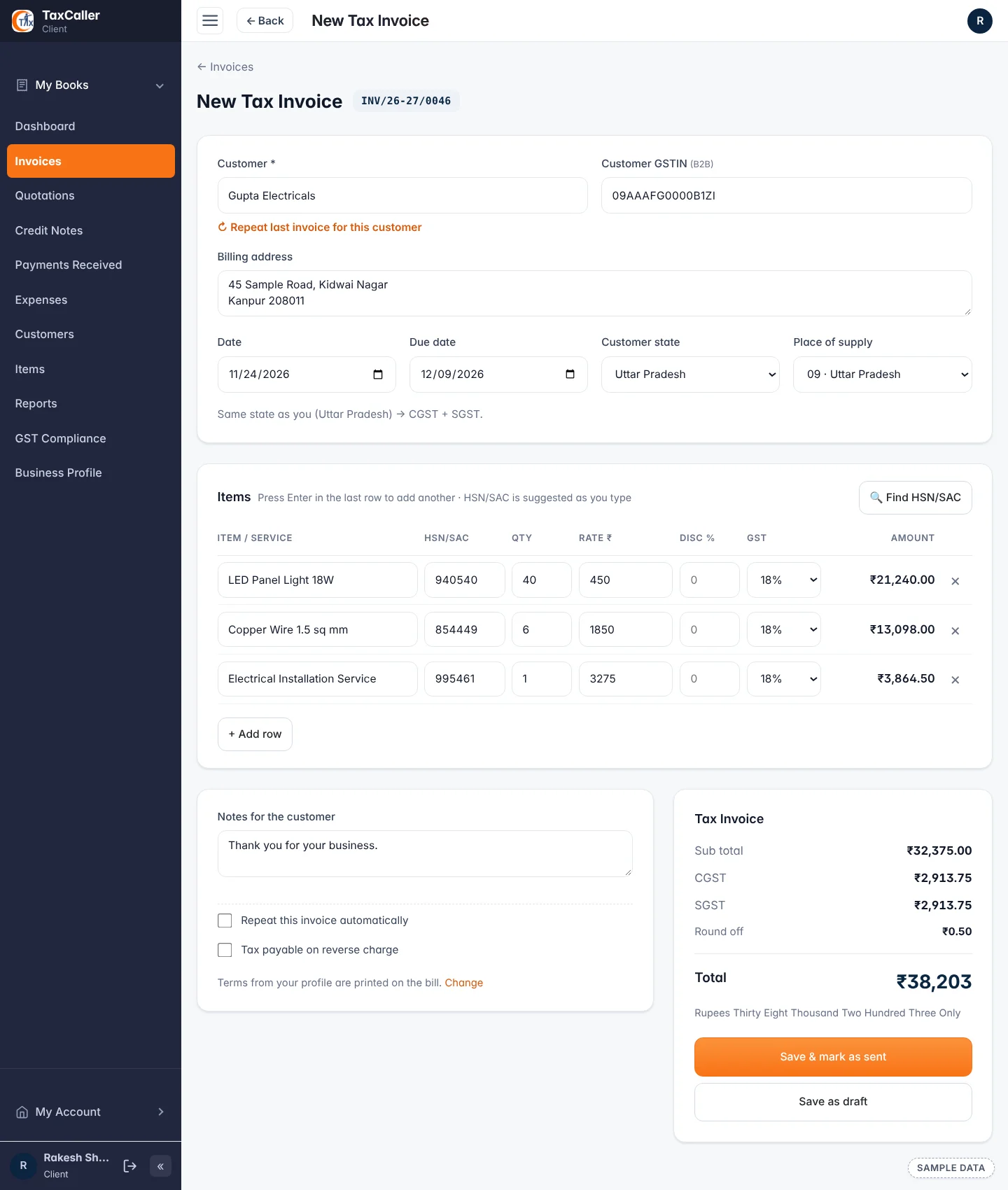
- Pick or type the customer. A saved customer fills in the address, state and GSTIN. A new name is saved as a customer when you save the bill. If you have billed this customer before, the "Repeat last invoice for this customer" link copies the last bill's lines with a new number and today's date.
- Check the GSTIN. The form tests the format and the official check digit as you type. It also shows a hint with the state, PAN and type of entity read from the number, so a typo shows up before the bill goes out.
- Confirm the place of supply. It is set from the customer's GSTIN or state, and you can change it. A short note under it names the state and tells you whether CGST plus SGST or IGST will apply.
- Add items. Type the item name and the HSN/SAC box suggests codes from the built-in list. Enter quantity, rate and a discount % if any, then choose the GST rate (0, 0.25, 3, 5, 12, 18, 28 or 40 per cent). Press Enter in the last row to add another line. New items are saved to your item list on their own.
- Set dates and notes. The due date starts at 15 days from the bill date. For a saved customer, Books sets it from the gap between bill date and due date on your last bill to them, and you can change it. Add a note for the customer if you like. Your standard terms print from the business profile.
- Tick reverse charge only if tax is payable by the buyer under reverse charge.
- Save. Choose "Save & mark as sent" or "Save as draft". The total is rounded to the nearest rupee and the amount is written in words in the Indian style (lakh and crore).
Two checks run in the background: a duplicate warning for the same customer and total within 3 days, and a warning when a B2B line has an HSN/SAC under 4 digits.
Need a rate before you bill? The HSN code finder and the GST calculator on our site help you check codes and tax outside the app. Inside Books, note that the GST rate is not filled from the HSN code. The app tells you to check the rate for your item yourself, because the same chapter can carry different rates.
Invoice numbering that follows the rules
Each document type has its own automatic series for each financial year, for example INV/26-27/0001 for invoices, QT/ for quotations, CN/ for credit notes and BS/ for bills of supply. The series restarts on 1 April. You can change the invoice prefix (up to 5 characters), and the full number never goes past 16 characters. Once a number is given it never changes, and a bill cannot be moved into another financial year by editing its date.
If you cancel a bill, the number stays in your series and the bill is marked Cancelled, as GST practice expects. A bill that already has a payment against it cannot be cancelled. You make a credit note instead.
Rule 46 invoice fields and where Books prints them
The contents of a GST tax invoice are set by Rule 46 of the CGST Rules, 2017 on the CBIC site. The table maps each main clause to the matching field in Books, and says plainly where Books has no field.
| Rule 46 clause | What the law asks for | In TaxCaller Books |
|---|---|---|
| (a) | Supplier name, address and GSTIN | Printed from your business profile, with state |
| (b) | Consecutive serial number, up to 16 characters, unique for the financial year | Automatic series per type and FY, capped at 16 characters |
| (c) | Date of issue | Invoice date, plus terms and due date |
| (d) | Recipient name, address and GSTIN if registered | Bill-to block with state and GSTIN |
| (e), (f) | For unregistered buyers of ₹50,000 and above (or on request below it): name, address, delivery address, and state name and code | Customer name, address and state are saved and printed. A different delivery address goes in the note |
| (g), (h) | HSN code and description | HSN/SAC column and item name on each line |
| (i) | Quantity and unit (UQC) for goods | Quantity with unit on each line |
| (j), (k) | Value of the supply, and the taxable amount net of any discount or abatement | Line discount %, taxable value and total |
| (l), (m) | Tax rate and tax amount by CGST, SGST, IGST, UTGST, cess | CGST and SGST or IGST rate and amount per line, plus rate-wise totals. No cess and no separate UTGST label (SGST label is used) |
| (n) | For sales across state lines, the place of supply and its State | Place of supply with state code and name |
| (o) | Delivery address if different from place of supply | No separate ship-to field. Type the delivery address in "Notes for the customer", which prints on the bill |
| (p) | A statement on whether the buyer pays the tax (RCM) | "Whether tax is payable on reverse charge: Yes/No" |
| (q) | Signature or digital signature | "For (business) Authorized Signature" with your uploaded signature image |
| (r) | QR code with IRN for e-invoices | Not available. Books does not generate IRN |
Bill of supply, composition, unregistered buyers and reverse charge
Not every sale is a tax invoice. Under GST, a dealer in the composition scheme and a seller of exempt goods or services issue a bill of supply in place of a tax invoice. Books handles these cases as follows.
Composition dealers
Tick "I am a composition dealer" in the Business Profile once. From then on, your invoices come out as a Bill of Supply with no GST charged, and each one prints the line "Composition taxable person, not eligible to collect tax on supplies." The composition rules on the CBIC site ask for these words at the top of the bill of supply (notified as Rule 5(1)(f) of the CGST Rules). Note that a composition dealer does not file GSTR-1, and Books says so. It does not prepare CMP-08 or GSTR-4.
Exempt and nil-rated sales
A regular dealer can also pick Bill of Supply as the document type, with its own BS/ series. Lines at 0% and bills of supply go into the nil and exempt table of GSTR-1.
Selling to consumers (B2C)
Leave the GSTIN empty and the customer is treated as unregistered. In GSTR-1, such sales go to B2C Small or B2C Large based on place of supply and bill value. For a bill of ₹50,000 and above, Rule 46 still asks for the buyer's name, address, delivery address and state, so fill in the customer's name, address and state, and add a different delivery address in the note.
Reverse charge
On a tax invoice, a "Tax payable on reverse charge" tick prints Yes on the bill and sets the reverse charge flag in the GSTR-1 data. Use it only for notified reverse charge supplies.
Quotations that turn into invoices
Send a price offer as a Quotation with its own QT/ number. When the customer says yes, open the quotation list and choose "Convert to invoice". The customer and lines move to a new tax invoice, and the quotation is marked "Invoiced" so you never bill it twice.
For regular clients there are two more short cuts. "Repeat last invoice" copies the last bill for that customer. Recurring invoices can be set to every month, every 3 months or every year, with an optional "stop after N bills". On the due date, Books makes the bill as a draft, and the dashboard shows "N repeat invoices ready as draft". You check each one and send it.
Credit notes under Section 34
When goods come back, the goods or services turn out deficient, or the taxable value or tax on the invoice was higher than it should be, GST law lets the supplier issue a credit note. Section 34 of the CGST Act says the credit note must be shown in the return for the month it is issued, and not later than 30 November after the end of the financial year of the supply, or the annual return date if earlier.
In Books, a credit note can only be made from an invoice or bill of supply that has already been sent. The credit note prints "Against Invoice (number) dt. (date)", reduces the balance due on that bill, and adds back stock if you track stock. In GSTR-1 it goes to table 9B (CDNR for registered buyers, CDNUR for others).
Books has no debit note yet.
Payments received, ageing, reminders and statements
Billing software earns its keep when it tells you who owes you money. Books tracks every bill through Draft, Unpaid, Partly paid, Paid, Overdue (with the number of days) and Cancelled.
- Record a payment on one bill with mode (UPI, bank, cash, cheque, card or other) and a reference number.
- Payments Received lets you enter one lump sum from a customer. Books sets it against the oldest unpaid bills first, or against the bills you choose. Any extra is kept as an advance and used on that customer's next bill on its own.
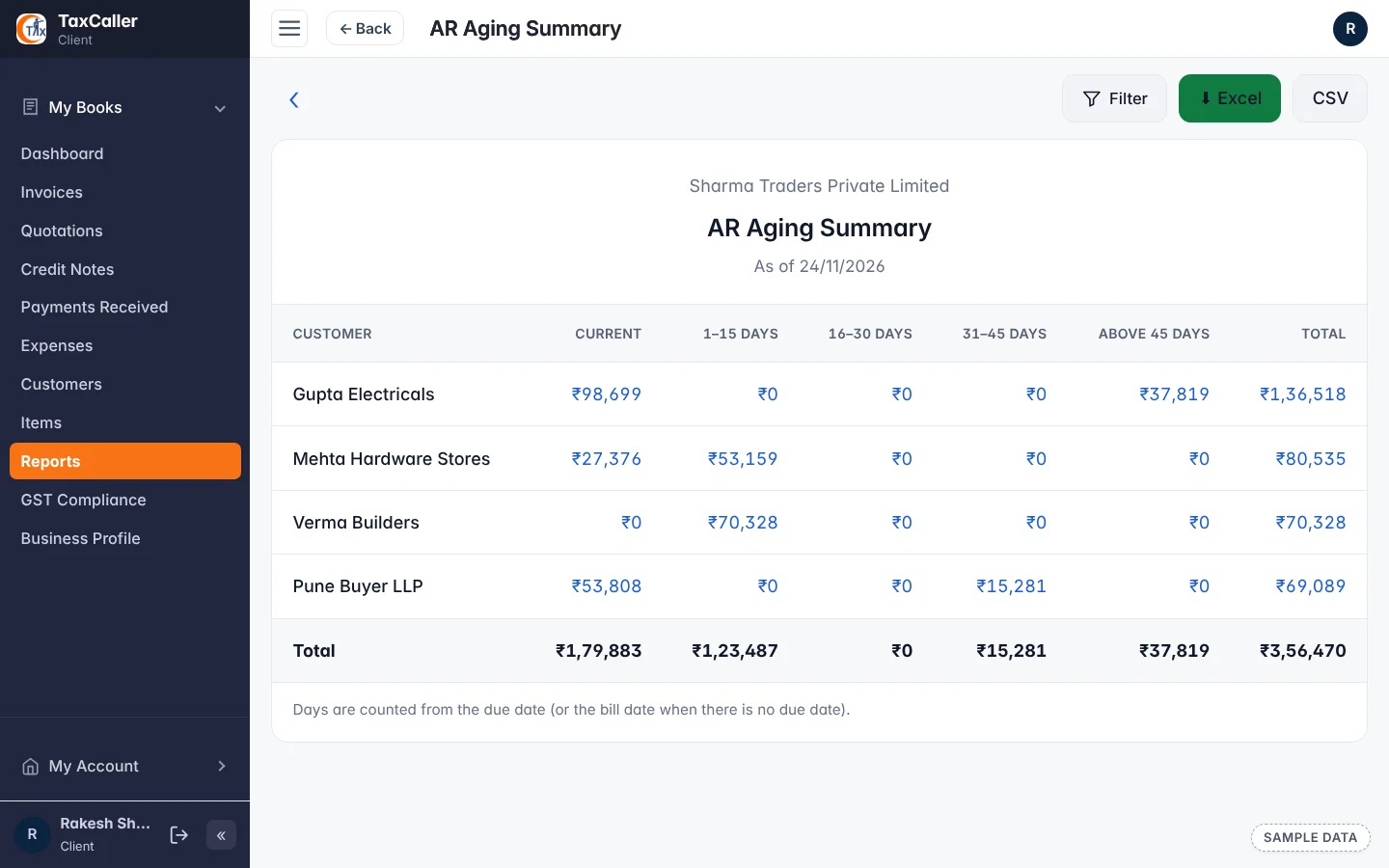
- Receivables ageing splits dues into Current, 1 to 15, 16 to 30, 31 to 45 and above 45 days past the due date.
- Overdue reminders list each late bill with a one-tap WhatsApp message. The message carries the amount, days overdue, a link to the bill and your UPI ID. Books notes the "reminded on" date so you can see when you last asked.
- Customer statement shows the opening balance, bills, credit notes and payments with a running balance.
Books does not take card or net banking payments for you. The customer pays by UPI QR or bank transfer, and you record the payment.
Expenses, purchases and stock
Expenses and purchase bills
Enter what you spend under 14 categories, mark it paid or due, add the payment mode and attach a photo of the bill. Rent or salary that repeats every month can be set to add itself. Two helpers speed up entry: Books can read a bill photo in your browser and fill the form, and you can speak the entry instead of typing. Always check the amounts they fill.
Before saving, Books checks the seller's GSTIN check digit, that taxable value plus GST equals the total, the tax type against the state, the date (not in the future, not older than 18 months) and duplicate bills. A purchase billed to your own GSTIN is marked as a purchase for input tax credit. Anything else is kept as a plain expense.
Stock
Stock is optional and set per item. Enter opening stock, add or reduce stock by hand, and Books takes off quantities sold on bills (credit notes add them back). A low-stock alert warns you before you run out, and the Stock Summary report shows the position. Stock valuation methods are not part of Books.
Reports you can download in Excel
Every report can be run for today, yesterday, this or last week, month, quarter (Indian FY quarters), financial year or custom dates. Each one downloads as Excel (.xlsx) and CSV, so your accountant can work on it without logging in.
| Group | Reports in Books |
|---|---|
| Sales | Sales by Customer, Sales by Item, Sales Summary (month-wise) |
| Receivables | Customer Statement, Customer Balance Summary, AR Aging Summary, AR Aging Details, Payments Received |
| Costs and profit | Profit & Loss (simple: sales less expenses entered), Expenses by Category, Purchase Register (GST credit) |
| Stock | Stock Summary |
| GST | GST Summary (month-wise), HSN-wise Summary, link to the GSTR-1 file |
The Profit & Loss here is a quick view, not a full set of accounts. If you need a balance sheet or ledgers, our accounting and bookkeeping service can keep full books for you.
GSTR-1 JSON, GSTR-3B worksheet and the return check
This is where billing meets filing. Open GST Compliance in Books and pick a month.

GSTR-1 tables built from your bills
Books fills table 4A (B2B), 5 (B2C Large), 7 (B2C Small), 9B (credit notes, CDNR and CDNUR), 8 (nil and exempt), 12 (HSN summary, split into B2B and B2C with UQC codes) and 13 (documents issued). Quotations and drafts stay out.
An 8-point pre-check
Before you download, Books checks that your own GSTIN is valid and regular, every customer GSTIN passes the check digit test, every taxed item has an HSN/SAC of 4 or more digits, the place of supply is a valid state, IGST and CGST/SGST are used the right way round, no invoice number is used twice, numbers follow the 16-character format, and bill totals match items plus tax. Each failed point has a "Fix" link that takes you to the bill.
Download and upload
The GSTR-1 file comes as JSON in the format of the GST portal's offline upload, and as Excel or CSV in the offline tool's column style. Download needs a fresh email OTP, and Books then records the month as filed, with date and name, in a filing history tab. You upload the JSON yourself on the GST portal: Services, Returns, Returns Dashboard, pick the period, then Prepare Offline on the GSTR-1 tile. Books does not file to the portal for you.
Return check and month lock
The return check box lets you mark a month's data final. Bills of that month are then locked. It refuses to lock when GSTR-1 has errors, 3B sales do not match bills, ITC claimed is more than GSTR-2B, or bills were changed after filing. It warns about drafts, a missing 2B and earlier months not filed.
GSTR-3B and annual worksheet
A GSTR-3B worksheet with portal JSON is built from your bills and the GSTR-2B, with set-off, interest and late fee working. For clients this screen is read-only. Uploading the GSTR-2B and editing 3B are done by the TaxCaller team. After 31 March, a GSTR-9 annual worksheet is also prepared from the year's data.
Invoice print, PDF, templates, UPI QR and WhatsApp
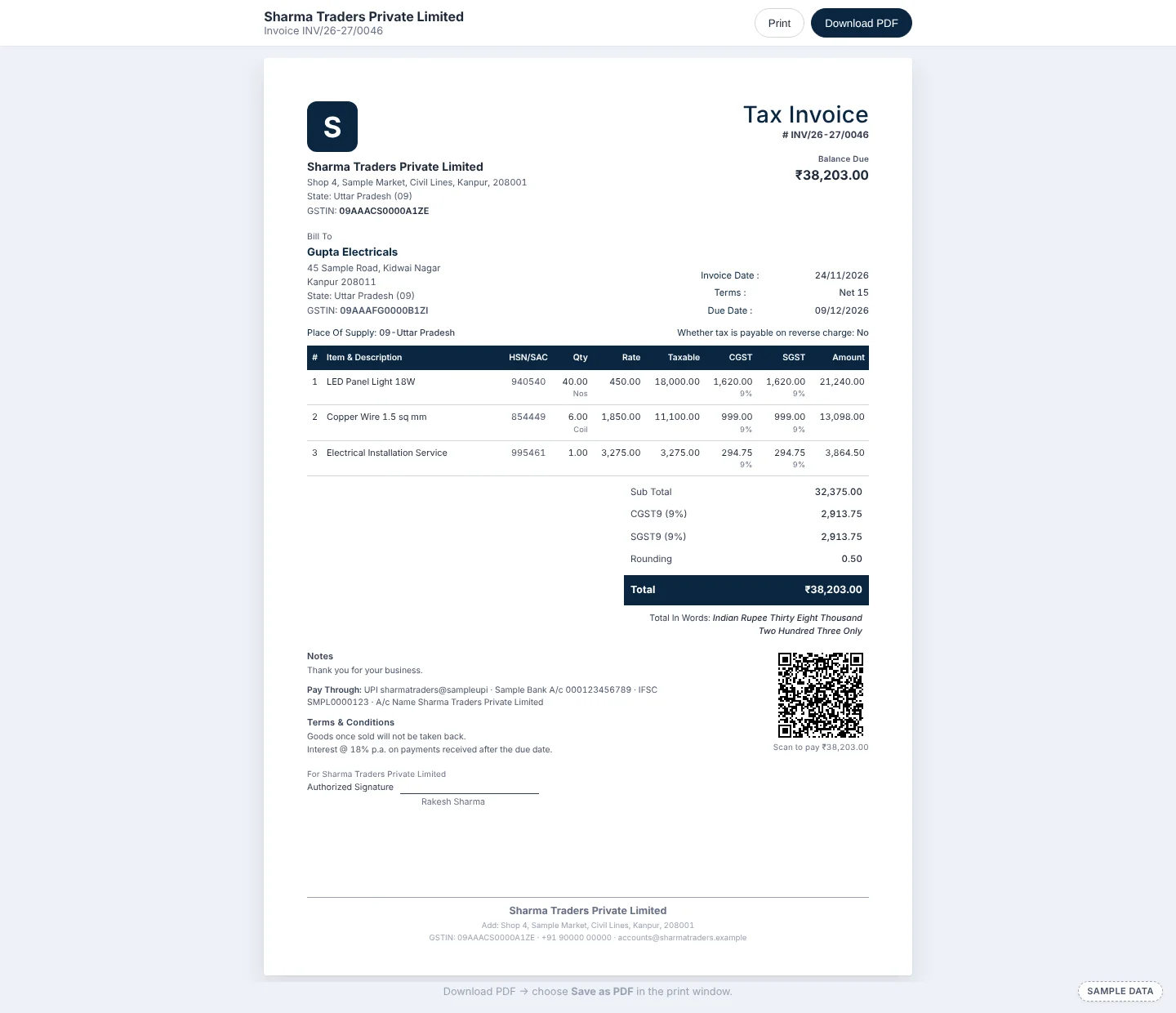
Choose from 5 invoice designs: Signature, Standard (the default), Classic, Modern and Compact. Add your logo (PNG, JPG or WebP up to 1 MB), a signature image, a theme colour and your terms. A PAID stamp appears once a bill is settled, and drafts print with a watermark.
On any unpaid invoice, a UPI QR code is printed for the exact balance, with "Scan to pay ₹…" under it. You record the receipt once paid.
To send the bill:
- Print it straight from the bill page.
- Download PDF opens your browser's print window. Choose "Save as PDF" there. The file is made by your browser, not by our server.
- WhatsApp opens a ready message with the amount and a link to the bill.
- Copy link gives a read-only bill page that your customer can open without any login. The link is signed and the page is hidden from search engines.
Books does not send bills by email from inside the app. Attach the saved PDF to your own email if a customer wants it that way.
Security and sign-in
There are no passwords in Books. You sign in with a 6-digit code sent to your email. The code works for 10 minutes and allows 5 tries, and repeated requests are slowed down. Only a keyed hash of the code is stored, never the code itself. If the owner has turned them on, "Continue with Google" and an SMS code to your registered mobile are also offered.
Every page and report is filtered by your account. Another client's bill returns "not found". The server database is backed up every 3 hours, kept for 10 days, with daily copies kept for 30 days. That backup is TaxCaller's server copy, not a file you can download, so keep your report exports if you want your own record.
One point to know: TaxCaller staff who handle your compliance or billing can view your bills read-only.
Use it on phone or PC: install as a web app
Books runs in any modern web browser. You can also install it as a web app. Tap "Install app" and it gets its own icon. On phones, a bottom menu has a My Books tab.
This also answers the common search for free billing software for PC. You do not need a Windows setup file. Open the site in your PC browser, sign in and, if you like, install it as an app. There is no Play Store or App Store app yet, and Books needs the internet to work. Without a connection you see an offline page, not your bills.
What TaxCaller Books does not do yet
Today, Books does not offer:
| Not available | What to do instead |
|---|---|
| E-invoice (IRN and signed QR from the IRP) | If e-invoicing applies to you, generate IRN on the government IRP or use a tool that connects to it |
| E-way bill | Generate it on the e-way bill portal |
| Debit note, delivery challan, proforma invoice, purchase order, sales order | Use a quotation for price offers. Other documents must be made outside Books |
| Export invoices, LUT, SEZ supplies, foreign currency | Talk to your accountant |
| Cess, TDS or TCS on invoices, a separate UTGST label | Not suited if your goods attract cess |
| Email sending, server-made PDF, payment gateway | Use WhatsApp, link or browser PDF, and UPI QR |
| Bank feeds or bank reconciliation | Record receipts by hand |
| Staff logins, user roles, several businesses on one self-signup account | One login per business |
| Full accounting (ledgers, journal, trial balance, balance sheet, depreciation) | See our bookkeeping service |
| Import from other software or Excel, full data export | Reports export one by one in Excel or CSV |
| Offline billing, native Android or iOS app | Use the browser or the installed web app online |
| GSTIN lookup from the GST portal, direct filing by API | Enter GSTIN yourself and upload the JSON on the portal |
TaxCaller clients whose several GSTINs are linked by our team can switch between them, and each GSTIN keeps its own bills and returns. Self-signup accounts have one business each.
Free billing, paid filing help if you want it
The billing module costs nothing today. Filing is a separate choice. You can download the GSTR-1 JSON and upload it yourself, or you can hand the work to a TaxCaller expert for a fee through our GST return filing service. When the team files for you, the download button is replaced by "Filed by TaxCaller team", and a tax summary email reaches you once 3B is filed.
How to start in 3 steps
- Create your account. Open the TaxCaller sign-up page, enter your email and the 6-digit code sent to it. Then fill in your business name, your name, a 10-digit mobile number and your GSTIN if you have one (or pick your state).
- Check your business profile. It starts filled from your sign-up. Add the address, state, bank and UPI details, logo and terms. Tick composition dealer if that applies.
- Make your first bill. Click New Invoice, add the customer and items, and save. Share it on WhatsApp or print it.
Already a TaxCaller client? Sign in with your email code and open My Books from the menu.
Checklist for choosing any GST billing software
Test any tool on five real bills against these points before you switch.
| Check | Why it matters |
|---|---|
| All Rule 46 fields print, with a 16-character FY series | A bill missing a field can cost your buyer input tax credit |
| CGST/SGST vs IGST set from place of supply | Wrong tax type means paying again under the right head and then claiming a refund |
| GSTR-1 file in portal format, with a pre-check | Saves retyping and catches errors before upload |
| Credit notes linked to the original invoice | A credit note must quote the original invoice, and Section 34 sets a time limit |
| E-invoice and e-way bill, if you need them | Turnover and goods movement decide this |
| Clear free plan terms: caps on invoices, users, features | Some free plans stop at a monthly count |
| Online vs offline, PC vs phone | Pick what matches where you bill |
| Exports in Excel or CSV | Your data should leave with you |
| Sign-in security and backups | Bills hold customer and price data |
The GSTN accounting and billing software list
People often search for "free GST billing software by government". Under this scheme GSTN did not build a billing app of its own. It listed third-party accounting and billing software for MSMEs with turnover below ₹1.5 crore, under Downloads, Accounting and Billing Software on the GST portal. The official FAQ on the GST tutorial site says the software was free to eligible taxpayers till 31 March 2021, or while annual turnover stays under ₹1.5 crore, after which vendors may charge. It also says GSTN does not endorse or warrant these products. Check the portal for the current list before relying on it.
When you need e-invoicing (IRN)
E-invoicing applies to supplies to registered buyers (B2B) and exports by taxpayers whose aggregate turnover in any preceding financial year from 2017-18 has gone above ₹5 crore. This limit has applied from 1 August 2023 under Notification 10/2023-Central Tax. From 1 January 2027, Notification 04/2026-Central Tax also brings in reverse charge purchases from unregistered persons and import of services for these taxpayers. IRNs are generated on the e-invoice portal. Some entities are exempt, such as SEZ units, banks, insurers, goods transport agencies and passenger transport services. If you are below this limit, a normal tax invoice like the one Books prints is enough. If you cross it, you need a tool that connects to the IRP.
Conclusion
For a small business under the e-invoice limit, good GST billing software should print a correct bill, work out tax the same way each time, chase dues and hand clean data to GSTR-1. TaxCaller Books does those jobs in your browser, with 5 invoice designs, UPI QR, WhatsApp sharing, Excel reports and a GSTR-1 JSON with an 8-point pre-check. It has no e-invoice, no e-way bill and no full accounting yet, and we have listed every such gap above.
If that fits, create your account and make your first bill today.
GST billing software FAQs
Is TaxCaller's GST billing software free?
Yes, today it costs nothing. Your account menu shows "Plan: Free. All features open. Nothing to pay now." No feature in the billing module is locked. Terms can change in future, and the plan line in your account is where you would see it. Filing returns through a TaxCaller expert is a separate paid service.
Can I use it as free billing software for PC?
Yes. Open the site in any modern browser on your Windows PC or laptop and sign in. There is no setup file to download. You can also install it as a web app from the "Install app" button so it opens in its own window with an icon. It needs an internet connection while you work.
Does TaxCaller Books work offline?
No. Books is online billing software. Your bills, customers and reports live on TaxCaller's server, so you need an internet connection to make or open a bill. If the connection drops, the installed web app shows an offline page, not your data. If you bill in places with no network, an offline desktop tool may suit you better.
Can I generate an e-invoice (IRN) in TaxCaller Books?
Not yet. Books prints a normal GST tax invoice and does not connect to the Invoice Registration Portal, so it cannot get an IRN or signed QR code. E-invoicing applies to B2B supplies and exports once aggregate turnover crosses ₹5 crore in any year from 2017-18. Below that, a normal tax invoice is enough.
Does it make e-way bills?
No. E-way bill generation is not part of Books today. If you move goods that need an e-way bill, generate it on the government e-way bill portal using the invoice details from Books. The invoice number, date, GSTINs, HSN codes and values you need are all printed on the bill, so copying them across is simple.
Can I download GSTR-1 JSON from my bills?
Yes. Pick a month under GST Compliance and Books builds GSTR-1 tables 4A, 5, 7, 8, 9B, 12 and 13 from your bills. It runs an 8-point pre-check, then lets you download the JSON after an email OTP. You upload it yourself on the GST portal under Prepare offline. Excel and CSV files are also given.
Is it suitable for composition dealers?
Yes. Tick "I am a composition dealer" in your Business Profile and your invoices become a Bill of Supply with no GST charged. Each one prints "Composition taxable person, not eligible to collect tax on supplies." Books tells you that GSTR-1 is not filed under composition, but it does not prepare CMP-08 or GSTR-4.
Can I manage more than one business or GSTIN?
A self-signup account holds one business with one GSTIN. TaxCaller clients whose several GSTINs have been linked by the TaxCaller team can switch between them, and each GSTIN keeps its own bills and returns. There are no staff logins or user roles yet, so one login works for one business owner.
Can I use it on my mobile phone?
Yes. Books opens in your phone's browser and has phone layouts for the dashboard and lists, plus a bottom menu with a My Books tab. You can install it to your home screen as a web app. There is no Play Store or App Store app yet, and you need mobile data or Wi-Fi to use it.
How safe is my billing data?
You sign in with a 6-digit code sent to your email, valid for 10 minutes, with no password to steal. Every page is filtered by your account. TaxCaller's server is backed up every 3 hours and daily copies are kept for 30 days. TaxCaller staff handling your compliance can view your bills read-only.
How do I start using TaxCaller Books?
Open the TaxCaller sign-up page, enter your email and the 6-digit code sent to it. Then give your business name, your name, a 10-digit mobile number and your GSTIN if you have one. Your business profile starts filled from these details. Add your address, bank and UPI details, then click New Invoice.
Can I send invoices on WhatsApp and collect UPI payments?
Yes. Each bill has a WhatsApp button that opens a ready message with the amount and a link to a read-only bill page. Unpaid bills print a UPI QR code for the exact balance. Books does not have a card or net banking gateway, so you record the payment yourself once the money arrives.
Can I make credit notes and quotations?
Yes. A quotation gets its own QT/ series, and "Convert to invoice" moves its customer and lines into a new invoice. A credit note is made only from an invoice already sent. It prints the original invoice number and date, reduces the balance due and goes into GSTR-1 table 9B. Debit notes and delivery challans are not available yet.
Can I download reports in Excel?
Yes. All 14 reports, from Sales by Customer and AR Aging to Purchase Register and HSN-wise Summary, download as Excel and CSV for any period you choose. There is no single full-data export or import from other software yet, so keep the report files if you want your own copy of the numbers.
Company details: TaxCaller India LLP, LLPIN AAQ-7388, About TaxCaller · Contact. Content updated .
Reviewed By

Expert for this topic TaxCaller client service
Abhinay Rai
Advocate
Abhinay Rai is a Advocate specialising in TaxCaller client service. This page describes TaxCaller Books as it works today, with screenshots made from sample data. It is updated when the software changes.